

Autopilot agents in Microsoft Foundry are digital workers that operate under two identities: an agent identity and an agent user account.
The agent identity is the standard Entra identity used for authentication and governance. The additional user account is what makes an agent an autopilot agent. It gives the agent its own email, calendar, OneDrive, Teams presence, and a place in the organisation chart. This allows the agent to participate naturally in Teams chats, access SharePoint, respond to events, and work with groups rather than only individuals.
Without this user account, an agent can only perform Microsoft 365 actions on behalf of a signed‑in user, which is limiting in collaborative or event‑driven scenarios. The autopilot model resolves this by giving the agent a persistent identity that fits into everyday organisational workflows.
The lifecycle begins with the Blueprint layer. Developers define the agent’s purpose, capabilities, and boundaries, then publish the blueprint. This becomes the template for every instance created later and is effectively the agent’s job description and technical specification.
The Instance layer is where managers hire agents from that blueprint. Each instance receives its own identity, is onboarded into a team, and is granted access to the resources it needs. This is where the agent becomes operational and able to work within Microsoft 365 surfaces such as Teams and SharePoint.
Above both sits the Fleet layer, owned by tenant administrators. This is where approval, policy, consent, licensing, and oversight are applied. The fleet view provides visibility across all agents in the tenant and ensures they comply with organisational rules.
The lifecycle follows a predictable sequence:
✅ Provision – Azure administrators set up the Foundry platform and assign developer permissions.
✅ Build and publish – developers define and test the blueprint.
✅ Approve and configure – tenant administrators review the blueprint, apply policy, and decide who can hire agents from it.
✅ Hire – managers create an instance and give it a role.
✅ Onboard – access managers or team leads grant the agent the resources it needs.
✅ Operate – the agent performs its work, with managers and teammates observing and adjusting as required.
✅ Offboard – when the agent is no longer required, the manager removes it.
✅ Retire or delete – tenant administrators or developers stop new hires or remove the blueprint entirely.
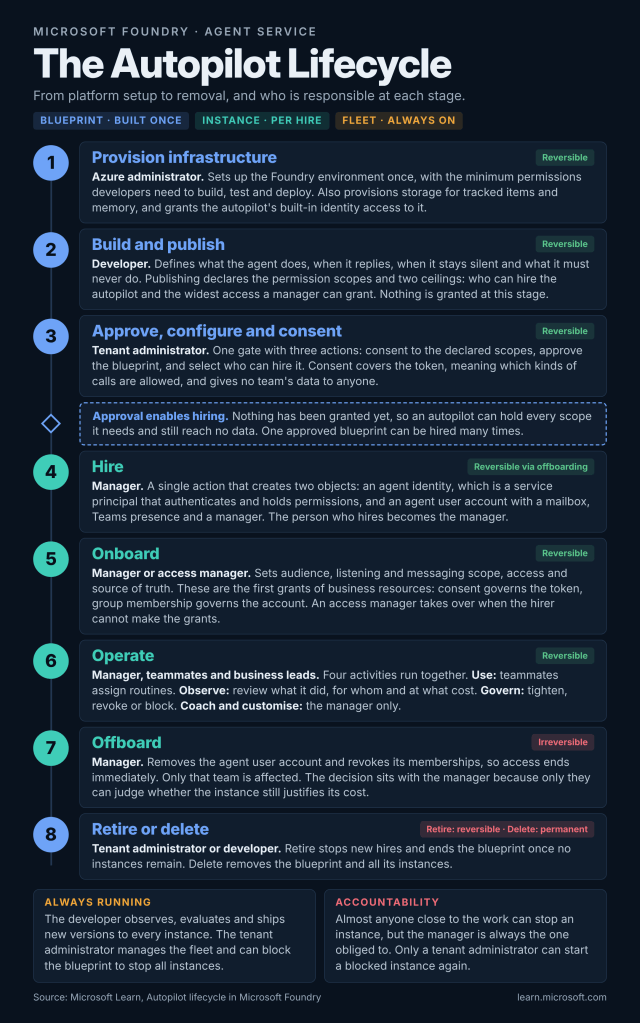
The strength of this model is in its clarity. Each role has a defined responsibility. Autopilot agents become part of the organisation’s operational structure rather than isolated experiments, making them easier to govern, secure, and scale.
Further reading: https://learn.microsoft.com/en-us/azure/foundry/agents/concepts/autopilot-lifecycle

